Showing posts with label Hide Posts. Show all posts

Thursday, 26 April 2018

How you can hide and Unhide a post on Facebook

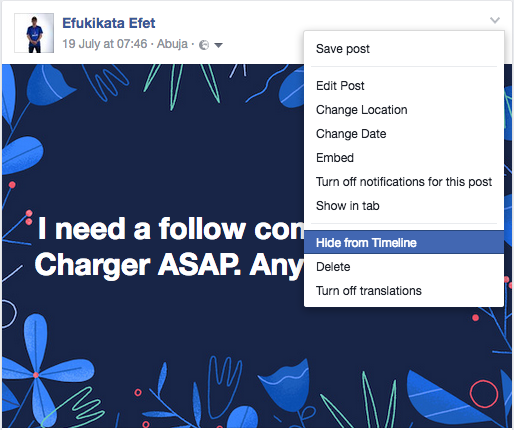
How you can hide and unhide a post on Facebook  actually has the same procedure as deleting a Facebook post but the difference in this case is that instead of choosing delete, you choose to hide Facebook post.

How Can I hide and unhide a Facebook Post

The difference between hiding and deleting a Facebook post is just on the effects for example, hiding a post that you've shared from your Page will remove it from your Facebook's Timeline and not from your Facebook's activity log. When you delete a Facebook post, you'll permanently remove it from your FB Page, including your Facebook Page's activity log.

How You can hide or delete a post from your Facebook Page:

  1. Go to the post on your Page's Timeline
  2. Click in the top-right corner
  3. Select Hide from Timeline or Delete

How to hide and unhide a Facebook Post


How You can Unhide a post you've hidden:

  1. Click on Settings at the top of your Facebook Page
  2. Click on Activity Log in the left column
  3. Click on next to the post you want to unhide and select ''Allowed on Page''
Still having difficulty deleting or hiding your Facebook post on your wall? Please leave us with your comment or check:

Saturday, 17 March 2018

How to hide and unhide Facebook post

How to hide and unhide a Facebook Post: It's the same process as deleting a Facebook post but the difference in this case is that instead of choosing delete, you choose to hide Facebook post.

How Can I hide and unhide a Facebook Post

The difference between hiding and deleting a Facebook post is just on the effects for example,  Hiding a post that you've shared from your Page will remove it from your Facebook's Timeline and not from your Facebook's activity log. When you delete a Facebook post, you'll permanently remove it from your FB Page, including your Facebook Page's activity log.

How To hide or delete a post from your Facebook Page:

  1. Go to the post on your Page's Timeline
  2. Click in the top-right corner
  3. Select Hide from Timeline or Delete

How to hide and unhide a Facebook Post


How to Unhide a post you've hidden:

  1. Click Settings at the top of your Facebook Page
  2. Click Activity Log in the left column
  3. Click next to the post you want to unhide and select Allowed on Page
Still having difficulty deleting or hiding your Facebook post on your wall? Please leave us with your comment or check: